
Updated 02/13/2026
AI Playground, uma suíte de aplicativos de IA generativa fácil de usar para PCs com IA da Intel, alimentada por GPUs Intel Arc, seja por processadores Intel® Core™ Ultra integrados ou por GPUs discretas Intel® Arc™. O AI Playground está disponível como um projeto de código aberto e um pacote de instalação para desktop do Windows.
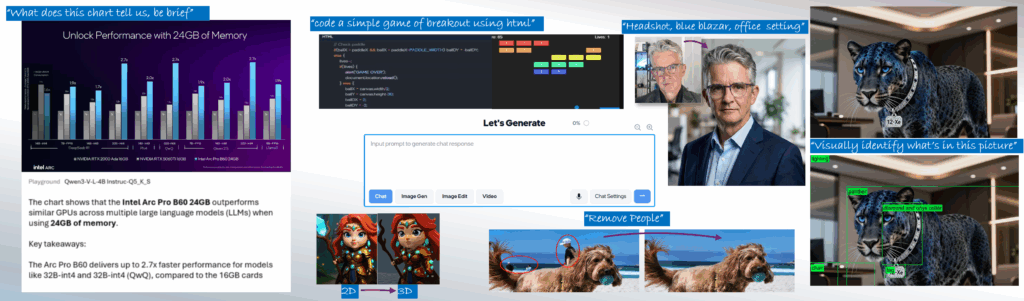
NOVO: An early alpha preview of AI Playground 3.0 is now available with support for vision models like Qwen3 VL, agentic tool calling for generating across features in a single chat discussion, and speech to prompt mode using the Whisper model and much more. Still fresh in AI Playground 2.6.2. is support for GPT-OSS via Llama.cpp Vulkan, PyTorch 2.8 with support for Flux.1 Kontext[dev], and Wan 2.1 VACE video gen, plus OpenVINO for chat (for GPU or NPU), and continued support for DeepSeek models, SD1.5 SDXL, Flux.1-Schnell and ComfyUI workflows, and more.
Download AI Playground:
Be sure to update your Graphics and NPU drivers(for supported Intel Core Ultra devices). Also note while an installer makes the process easy to get up and running, this is open source beta software, where components and version can have conflicts. Check the Seção de solução de problemas do leia-me do projeto para problemas conhecidos.
Faça backup de qualquer conteúdo valioso gerado em uma instalação anterior antes de instalar
| AI Playground Files as of Feb 13, 2026 |
Version | Links |
|
AI Playground 3.0 |
3.0.2b |
Release Notes | Baixar | Manual |
|
Source Code and Repo |
3.0.2b |
|
|
Community/Support |
|
Join Intel Insiders Discord, and access our dedicated |
For information and features on early access AI Playground v.3.0.0 alpha see the branch source readme e manual. This early alpha preview is rebuilt from the ground up with new agentic AI features, vision model support, and updated image generation and editing capabilities. A beta release is expected in Q1 2026
What is AI Playground
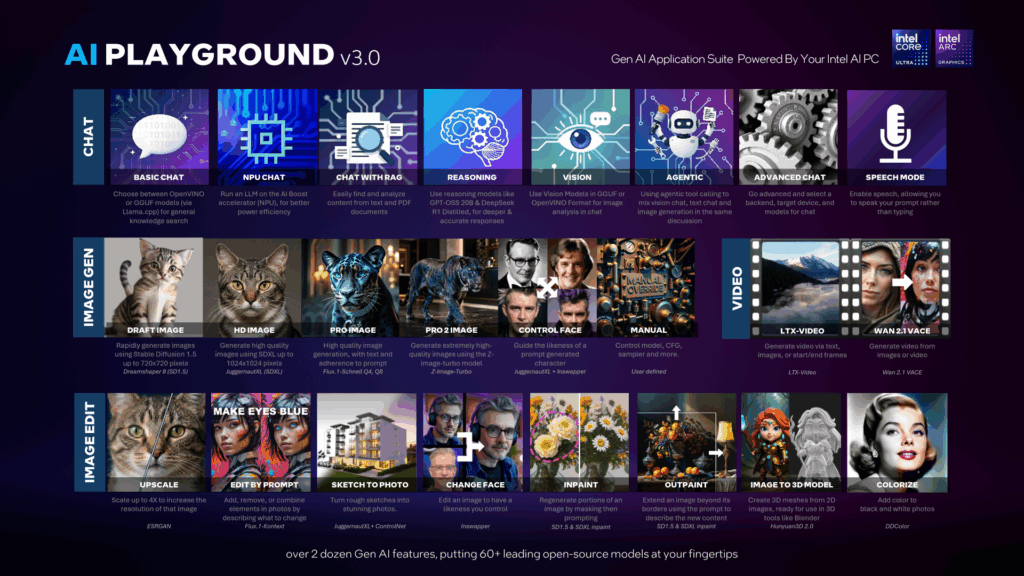
AI Playground beta is a free to download and app for doing Gen AI inferencing on your Intel Core Ultra or Intel Arc GPU based systems. AI Playground curates over 60 top open-source models and ties them to a variety of point and click features for chat, image generation, image generation and video.
Easy To Use: O AI Playground foi projetado para ser fácil de usar, permitindo que você comece a trabalhar com IA rapidamente. O AI Playground o avisará se e quando um modelo for necessário para uma tarefa, permitindo que você faça o download de um ou forneça o seu próprio. Além disso, nossas configurações são escritas e projetadas usando termos que fazem sentido para a tarefa, sem que você precise ser instruído em IA apenas para usá-la.
All-In-One AI Hub: Alterne perfeitamente entre os usos de criação de imagens, edição de imagense um chat LLM . O AI Playground mantém tudo isso junto em uma experiência fácil de usar. Atualmente, o AI Playground é compatível com Stable Diffusion 1.5, Stable Diffusion XL, Flux.1-Schnell, LCM Fast LoRAs, Image Upscale, Estilização de imagem para imagem, Inpainting, Outpainting, ChatBot com contexto de histórico de sessão e recursos LLM RAG que permitem obter resumos e pesquisar conteúdo em seu computador local.
Flexible: AI Playground will provide access to models for all features, and more advanced users can install their favorite models and tweak manual settings, to configure AI Playground to work the way they want it to work.
Local: O AI Playground é executado localmente, portanto, suas instruções e o resultado nunca saem do seu computador. Isso proporciona privacidade e controle do conteúdo e da entrada para trabalhar com IA, além de colocá-lo no controle sem que uma entidade superior censure seus comandos ou capture seus dados e conteúdo.
Hardware Optimized: O AI Playground aproveita a arquitetura de GPU Intel Arc, utilizando nossos potentes Intel Xe Cores e o mecanismo XMX.
Open: AI Playground is also an open-source project where our community can clone, fork or help us address features and capabilities of the main repo.
Recursos principais
AI Playground is a locally run Generative AI application suite that acts as an offline alternative to cloud tools such Gemini ChatGPT and Grok. AI Playground is intended to give consumers and AI curious prosumer easy and intuitive access to a wide variety of generative AI features using their Intel powered AI PC. This means you can be offline, without loading sensitive or personal data to 3rd party sites, for free, in a single app without having to know how to install and manage multiple AI backend frameworks. Key features:
- Latest and greatest chat models: Support for Qwen 3 VL, Mistral 7B, DeepSeek R1 or GPT-OSS, AI playground makes a variety of chat models available to users
- Vision, Reasoning and RAG: Chat features support Vision, Reasoning and RAG to analyze and get deep answers on both visual and text content.
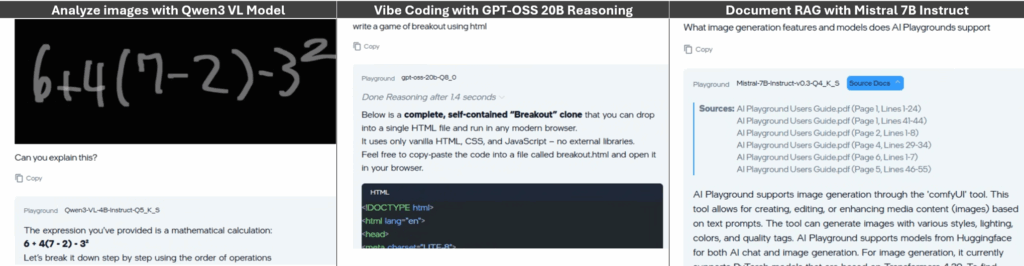
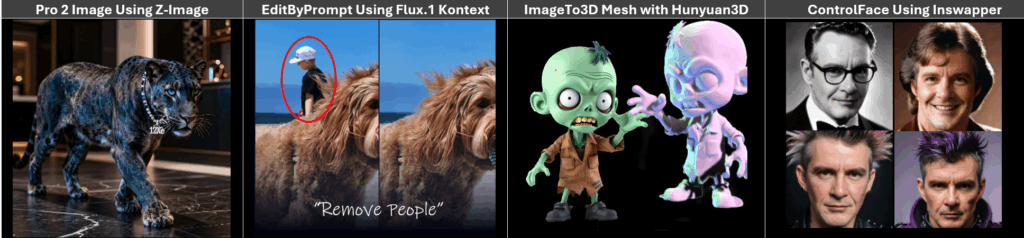
- Image Generation: From Stable Diffusion 1.5, SDXL, Flux.1 and Z-image models AI Playground is making a breadth of image generation from quick easy low-res draft generation to high quality image generation
- Image Editing: Subscription free and private control for upscaling, inpainting, outpainting, 2D to 3D mesh or editing images in a variety of ways. Good for editing personal photos to taking sketches and generated images to the next level with greater control.
New To AI Playground
O AI Playground oferece uma série de novas soluções, cada uma expandindo o que o AI Playground pode fazer, com base em sua arquitetura modular para fornecer valor e recursos mesmo entre as versões.
New Modalities
- Voice mode: AI Playground now supports a voice mode. From the app settings you can turn on Voice mode. This will load an AI voice model to the NPU of your Intel Core Ultra PC. When enabled a microphone icon will be available in the prompt. Simple click the icon and voice your prompt. Voice mode will convert your voice to text prompt
- Vision Model Support: New to AI Playground is Vision Model support. With Vision support you can paste or load an image to Chat mode and have AI Playground analyze the image, giving you insight, answers and information about the image
- Agentic Multi-Modal Tools. AI Playground exposes MCP tooling to our chat mode allowing you to use a core model to do agentic tasks across AI Playground features within a single chat discussion. This feature will allow you to use text chat, vision chat, and image generation withing a single discussion window. See Agentic Preset for more information
Unified Prompt:
AI Playground now deploys a single unified prompt window for all AI Playground features. This design aligns AI Playground to familiar AI tools like Gemini, Chat GPT and Grok
Light Theme:
You can now choose to experience AI Playground in a light-colored theme
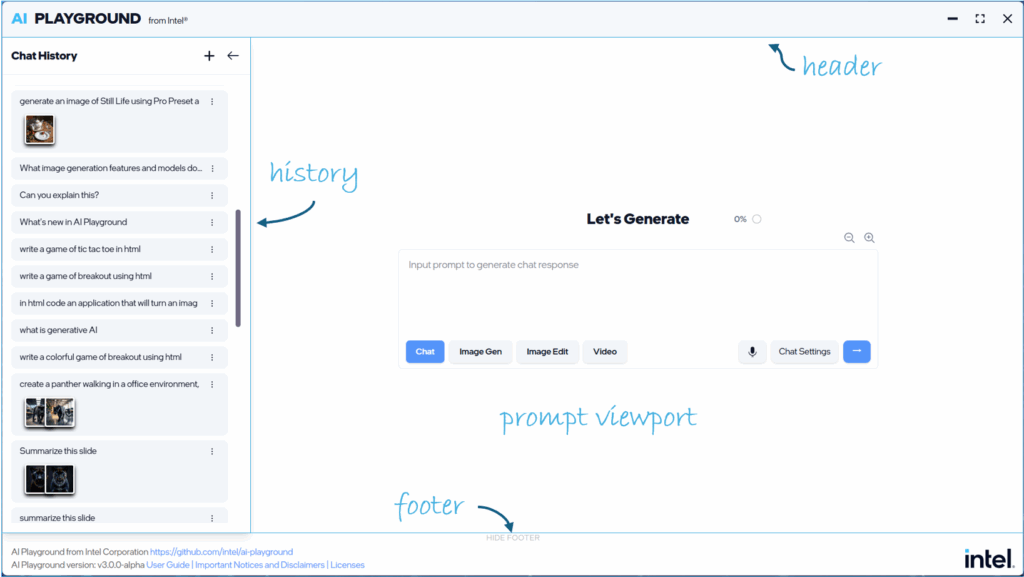
Prompt Modes, Settings and Presets:
The main prompt can now be directed to specific models and tasks through the Prompt Mode, Prompt Settings and Prompt Presets.
- Prompt Modes allow you to quickly and easily change between modalities from the main prompt: Select chat for vision and text based chat responses, Image Gen for image generation from text. Image Edit for altering or enhancing images. Video Gen: For creating video content from text or image input
- Prompt Mode Presets: From the Prompt Settings button you have access to dozens of Presets. Presets are similar to the previous AI Playground “Workflows” Settings, configured for specific tasks and usages but are now expanded to all Prompt modes. With Presets you can quickly access a define usage for Chat, Image Gen, Image Edit or Video where the model selections and settings are preset for that task. See the Preset Section for more information
Backends:
- OpenVINO: OpenVINO provides the best performance when using OpenVINO IR Models with the ability to target CPU, NPU or GPU. AI Playground provides access to a variety of chat, reasoning, vision and tool calling models in OpenVINO format in Chat mode:
- Llama.CPP: For access to latest models in GGUF format, AI Playground provides models such as Qwen 3VL, DeepSeek R1 Distilled, and GPT-OSS 20B in GGUF format, for use in the chat mode
- PyTorch: PyTorch is primarily used to support image diffusion based models for image generation, image editing and video generation. We provide access to models such as SDXL, Flux.1 Schnell, Z-Image-Turbo and more
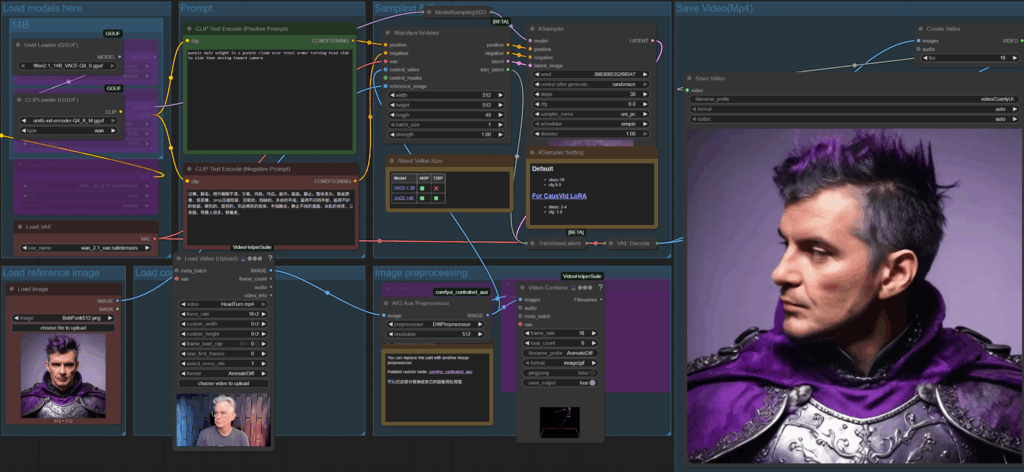
- ComfyUI: is a backend solution allowing us to easily create and deploy custom workflows for specific image and video Preset
ComfyUI Editor
For users interested in diving into ComfyUI workflows, or those already familiar with ComfyUI, we’ve provided direct access to its workflow editor, allowing users to edit or create workflows for use either directly from ComfyUI or in AI Playground. We encourage and welcome the community created workflows submitted and shared to AI Playground via Pull Requests to our project
See AI Playground In Action
AI Playground 3.0 at CES 2026
Demo Reel
Introduction Video of Core Features
Install Image Checkpoints
For more information, visit the AI Playground project on GitHub, or join our Discórdia entre Intel Insiders to engage directly with Intel and our Community on AI Playground
Avisos e isenções de responsabilidade: For information on AI Playground terms, license and disclaimers, visit the project and files on GitHub repo:





 English (United States)
  Spanish (Argentina)
  English (Australia/New Zealand)
  German (Austria)
  Portuguese
  English (Canada)
  Spanish (Chile)
  Chinese (China)
  Spanish (Colombia)
  English (Denmark)
  Arabic (Egypt)
  English (Finland)
  French
  German
  English (India)
  Indonesian
  Japanese
  Malay
Malay  Spanish (Mexico)
  English (Netherlands)
  English (Norway)
  Spanish (Peru)
  Tagalog (Philippines)
  Polish
  Arabic
  Korean
  Spanish (Spain)
  English (Sweden)
  English (Switzerland)
  Chinese (Taiwan)
  Thai
Thai  Turkish
  English (UK)
  Vietnamese
  Italian