
Updated 02/13/2026
AI Playground, una suite di applicazioni di IA generativa di facile utilizzo per i PC Intel AI, alimentati dalle GPU Intel Arc, sia integrate nei processori Intel® Core™ Ultra che tramite le GPU discrete Intel® Arc™. AI Playground è disponibile come progetto open-source e come programma di installazione per Windows.
NUOVO: An early alpha preview of AI Playground 3.0 is now available with support for vision models like Qwen3 VL, agentic tool calling for generating across features in a single chat discussion, and speech to prompt mode using the Whisper model and much more. Still fresh in AI Playground 2.6.2. is support for GPT-OSS via Llama.cpp Vulkan, PyTorch 2.8 with support for Flux.1 Kontext[dev], and Wan 2.1 VACE video gen, plus OpenVINO for chat (for GPU or NPU), and continued support for DeepSeek models, SD1.5 SDXL, Flux.1-Schnell and ComfyUI workflows, and more.
Scarica AI Playground:
Be sure to update your Graphics and NPU drivers(for supported Intel Core Ultra devices). Also note while an installer makes the process easy to get up and running, this is open source beta software, where components and version can have conflicts. Check the Sezione Risoluzione dei problemi del readme del progetto per i problemi noti.
Eseguire il backup di tutti i contenuti valutati generati da un'installazione precedente prima di installarli.
| File AI Playground as of Feb 13, 2026 |
Versione | Collegamenti |
|
AI Playground 3.0 |
3.0.2b |
Note di rilascio | Scaricare | Manual |
|
Codice sorgente e Repo |
3.0.2b |
|
|
Comunità/Supporto |
|
Unirsi Intel Insiders Discord, and access our dedicated |
For information and features on early access AI Playground v.3.0.0 alpha see the branch source readme e manual. This early alpha preview is rebuilt from the ground up with new agentic AI features, vision model support, and updated image generation and editing capabilities. A beta release is expected in Q1 2026
Cos'è l'AI Playground
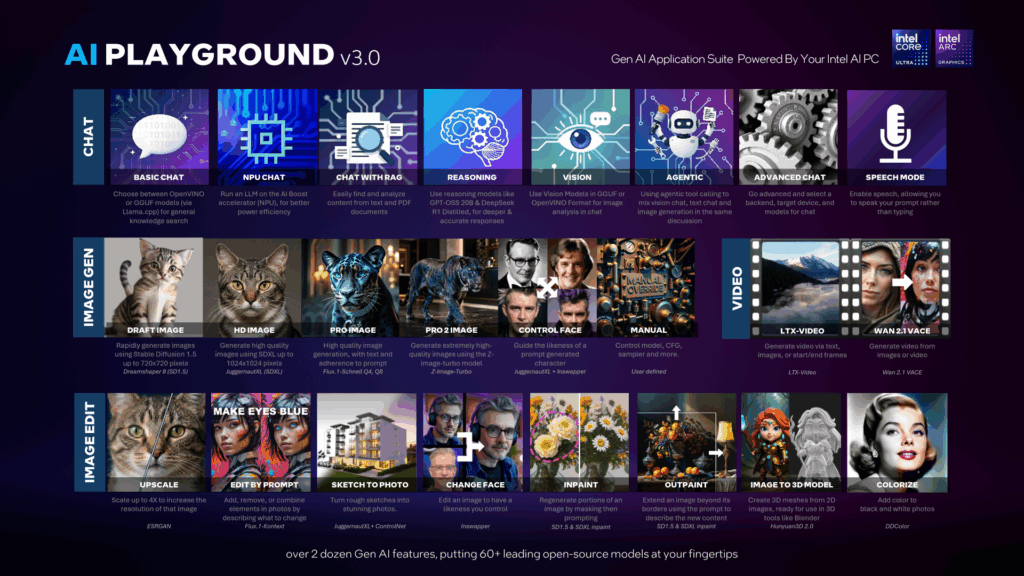
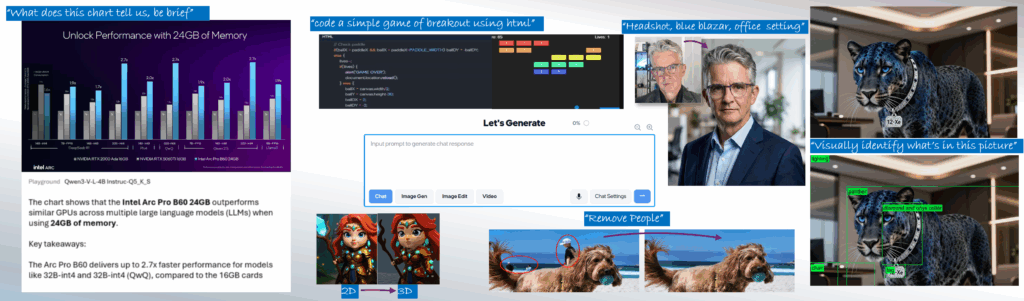
AI Playground beta is a free to download and app for doing Gen AI inferencing on your Intel Core Ultra or Intel Arc GPU based systems. AI Playground curates over 60 top open-source models and ties them to a variety of point and click features for chat, image generation, image generation and video.
Facile da usare: AI Playground è stato progettato per essere facile da usare, consentendo di lavorare rapidamente con l'intelligenza artificiale. AI Playground vi chiederà se e quando è necessario un modello per un compito, permettendovi di scaricarne uno o di fornirne uno vostro. Inoltre, le nostre impostazioni sono scritte e progettate utilizzando termini che hanno senso per il compito da svolgere, senza che l'utente debba essere istruito sull'IA solo per poterla utilizzare.
Hub AI all-in-one: Passare senza problemi dall'uso di creazione di immagini, modifica delle immagini, e un chat LLM . AI Playground riunisce tutto questo in un'unica esperienza di facile utilizzo. Attualmente AI Playground supporta Stable Diffusion 1.5, Stable Diffusion XL, Flux.1-Schnell, LCM Fast LoRAs, Image Upscale, Image to Image Stylization, Inpainting, Outpainting, ChatBot con il contesto della cronologia delle sessioni e le funzioni di LLM RAG che consentono di ottenere sommari e di cercare contenuti dal computer locale.
Flessibile: AI Playground fornirà l'accesso ai modelli per tutte le funzioni e gli utenti più avanzati potranno installare i loro modelli preferiti e modificare le impostazioni manuali per configurare AI Playground nel modo desiderato.
Locale: AI Playground viene eseguito localmente, quindi le richieste e l'output non lasciano mai il computer. Questo garantisce la privacy e il controllo dei contenuti e degli input per lavorare con l'intelligenza artificiale, e consente all'utente di avere il controllo senza che un'entità a monte possa censurare le sue richieste o catturare i suoi dati e contenuti.
Hardware ottimizzato: AI Playground sfrutta l'architettura Intel Arc GPU sfruttando i nostri potenti Intel Xe Cores e il motore XMX.
Aperto: AI Playground è anche un progetto open-source in cui la nostra comunità può clonare, forkare o aiutarci a risolvere le caratteristiche e le funzionalità del repo principale.
Caratteristiche principali
AI Playground is a locally run Generative AI application suite that acts as an offline alternative to cloud tools such Gemini ChatGPT and Grok. AI Playground is intended to give consumers and AI curious prosumer easy and intuitive access to a wide variety of generative AI features using their Intel powered AI PC. This means you can be offline, without loading sensitive or personal data to 3rd party sites, for free, in a single app without having to know how to install and manage multiple AI backend frameworks. Key features:
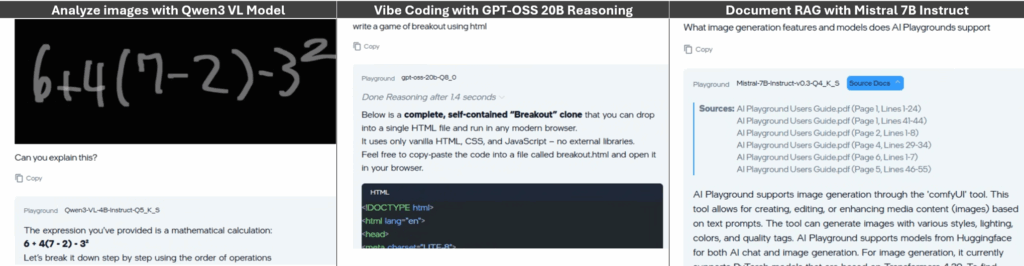
- Latest and greatest chat models: Support for Qwen 3 VL, Mistral 7B, DeepSeek R1 or GPT-OSS, AI playground makes a variety of chat models available to users
- Vision, Reasoning and RAG: Chat features support Vision, Reasoning and RAG to analyze and get deep answers on both visual and text content.
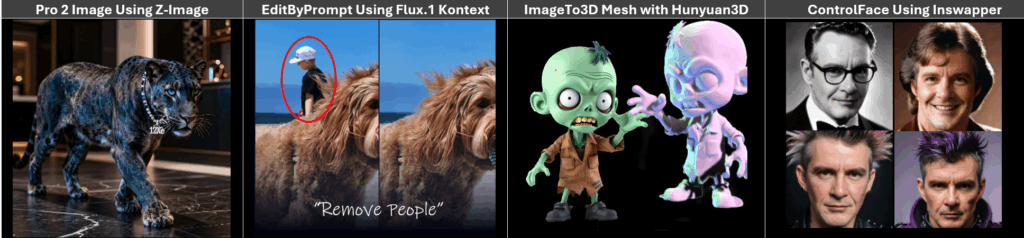
- Image Generation: From Stable Diffusion 1.5, SDXL, Flux.1 and Z-image models AI Playground is making a breadth of image generation from quick easy low-res draft generation to high quality image generation
- Image Editing: Subscription free and private control for upscaling, inpainting, outpainting, 2D to 3D mesh or editing images in a variety of ways. Good for editing personal photos to taking sketches and generated images to the next level with greater control.
New To AI Playground
AI Playground offre una serie di nuove soluzioni, ognuna delle quali amplia le possibilità di AI Playground, basandosi sulla sua architettura modulare per offrire valore e funzionalità anche tra una release e l'altra.
New Modalities
- Voice mode: AI Playground now supports a voice mode. From the app settings you can turn on Voice mode. This will load an AI voice model to the NPU of your Intel Core Ultra PC. When enabled a microphone icon will be available in the prompt. Simple click the icon and voice your prompt. Voice mode will convert your voice to text prompt
- Vision Model Support: New to AI Playground is Vision Model support. With Vision support you can paste or load an image to Chat mode and have AI Playground analyze the image, giving you insight, answers and information about the image
- Agentic Multi-Modal Tools. AI Playground exposes MCP tooling to our chat mode allowing you to use a core model to do agentic tasks across AI Playground features within a single chat discussion. This feature will allow you to use text chat, vision chat, and image generation withing a single discussion window. See Agentic Preset for more information
Unified Prompt:
AI Playground now deploys a single unified prompt window for all AI Playground features. This design aligns AI Playground to familiar AI tools like Gemini, Chat GPT and Grok
Light Theme:
You can now choose to experience AI Playground in a light-colored theme
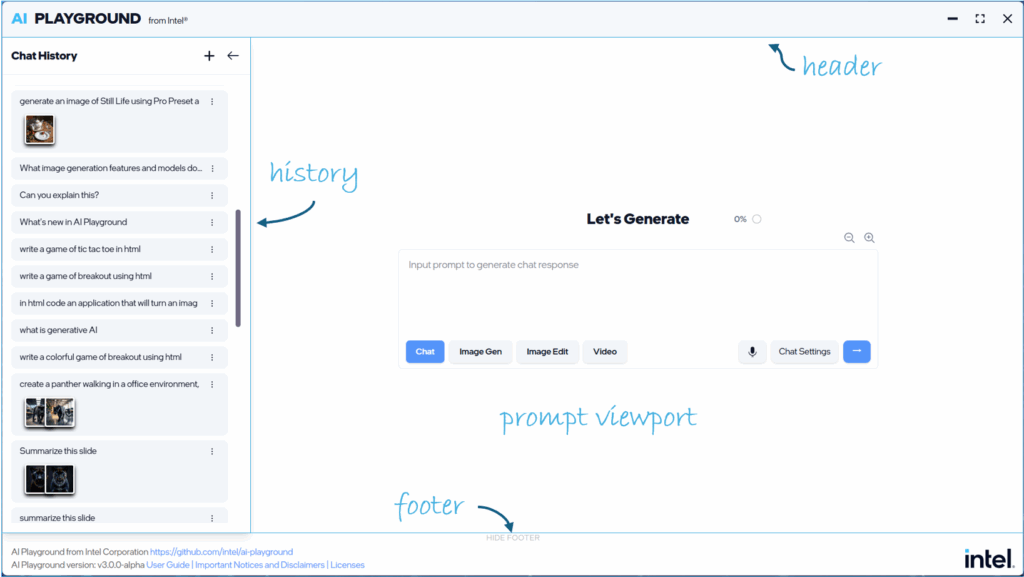
Prompt Modes, Settings and Presets:
The main prompt can now be directed to specific models and tasks through the Prompt Mode, Prompt Settings and Prompt Presets.
- Prompt Modes allow you to quickly and easily change between modalities from the main prompt: Select chat for vision and text based chat responses, Image Gen for image generation from text. Image Edit for altering or enhancing images. Video Gen: For creating video content from text or image input
- Prompt Mode Presets: From the Prompt Settings button you have access to dozens of Presets. Presets are similar to the previous AI Playground “Workflows” Settings, configured for specific tasks and usages but are now expanded to all Prompt modes. With Presets you can quickly access a define usage for Chat, Image Gen, Image Edit or Video where the model selections and settings are preset for that task. See the Preset Section for more information
Backends:
- OpenVINO: OpenVINO provides the best performance when using OpenVINO IR Models with the ability to target CPU, NPU or GPU. AI Playground provides access to a variety of chat, reasoning, vision and tool calling models in OpenVINO format in Chat mode:
- Llama.CPP: For access to latest models in GGUF format, AI Playground provides models such as Qwen 3VL, DeepSeek R1 Distilled, and GPT-OSS 20B in GGUF format, for use in the chat mode
- PyTorch: PyTorch is primarily used to support image diffusion based models for image generation, image editing and video generation. We provide access to models such as SDXL, Flux.1 Schnell, Z-Image-Turbo and more
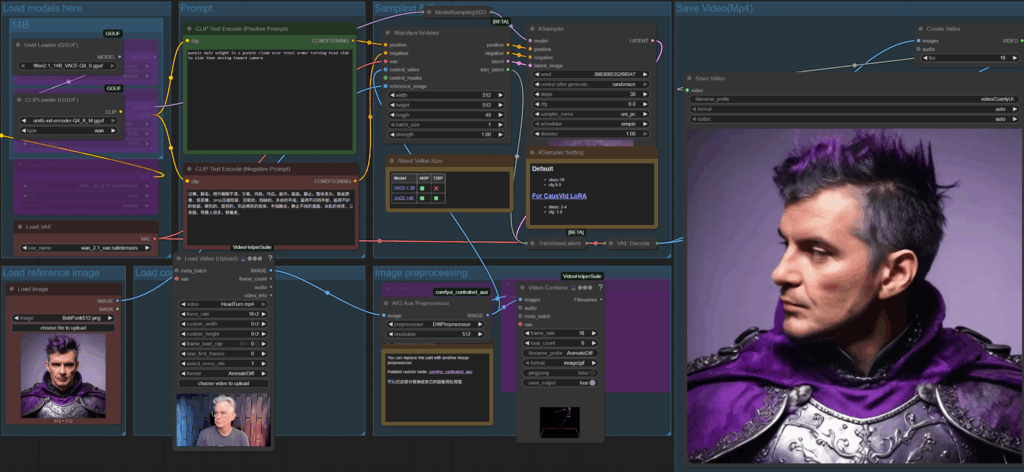
- ComfyUI: is a backend solution allowing us to easily create and deploy custom workflows for specific image and video Preset
Editor ComfyUI
For users interested in diving into ComfyUI workflows, or those already familiar with ComfyUI, we’ve provided direct access to its workflow editor, allowing users to edit or create workflows for use either directly from ComfyUI or in AI Playground. We encourage and welcome the community created workflows submitted and shared to AI Playground via Pull Requests to our project
Vedere il parco giochi AI in azione
AI Playground 3.0 at CES 2026
Bobina dimostrativa
Video di introduzione alle funzioni principali
Installare i punti di controllo dell'immagine
Per ulteriori informazioni, visitare il progetto AI Playground su GitHub, o unirsi al nostro Discordia per gli addetti ai lavori di Intel per impegnarsi direttamente con Intel e la nostra comunità su AI Playground
Avvertenze e dichiarazioni di non responsabilità: Per informazioni sui termini, la licenza e le esclusioni di responsabilità di AI Playground, visitare il progetto e i file su GitHub repo:




 English (United States)
  Spanish (Argentina)
  English (Australia/New Zealand)
  German (Austria)
  Portuguese
  English (Canada)
  Spanish (Chile)
  Chinese (China)
  Spanish (Colombia)
  English (Denmark)
  Arabic (Egypt)
  English (Finland)
  French
  German
  English (India)
  Indonesian
  Japanese
  Malay
Malay  Spanish (Mexico)
  English (Netherlands)
  English (Norway)
  Spanish (Peru)
  Tagalog (Philippines)
  Polish
  Arabic
  Korean
  Spanish (Spain)
  English (Sweden)
  English (Switzerland)
  Chinese (Taiwan)
  Thai
Thai  Turkish
  English (UK)
  Vietnamese
  Italian