Updated 03/27/2026
AI Playground, an easy-to-use Generative AI app suite for Intel AI PCs, powered by Intel Arc GPUs, either built-in Intel® Core™ Ultra Processors or via Intel® Arc™ discrete GPUs. AI Playground is available as an open-source project and packaged Windows desktop installer.
NEW: An early alpha preview of AI Playground 3.0 is now available with support for vision models like Qwen3 VL, agentic tool calling for generating across features in a single chat discussion, and speech to prompt mode using the Whisper model and much more. Still fresh in AI Playground 2.6.2. is support for GPT-OSS via Llama.cpp Vulkan, PyTorch 2.8 with support for Flux.1 Kontext[dev], and Wan 2.1 VACE video gen, plus OpenVINO for chat (for GPU or NPU), and continued support for DeepSeek models, SD1.5 SDXL, Flux.1-Schnell and ComfyUI workflows, and more.
Download AI Playground:
Be sure to update your Graphics and NPU drivers(for supported Intel Core Ultra devices). Also note while an installer makes the process easy to get up and running, this is open source beta software, where components and version can have conflicts. Check the Troubleshooting section of the project readme for known issues.
Back-up any valued content generated from a previous installation before installing
| AI Playground Files as of March 27, 2026 |
Version | Links |
|
AI Playground 3.0 |
3.0.3b |
Release Notes | Download | Manual |
|
Source Code and Repo |
3.0.3b |
|
|
Community/Support |
|
Join Intel Insiders Discord, and access our dedicated |
For information and features on early access AI Playground v.3.0.0 alpha see the branch source readme and manual. This early alpha preview is rebuilt from the ground up with new agentic AI features, vision model support, and updated image generation and editing capabilities. A beta release is expected in Q1 2026
What is AI Playground
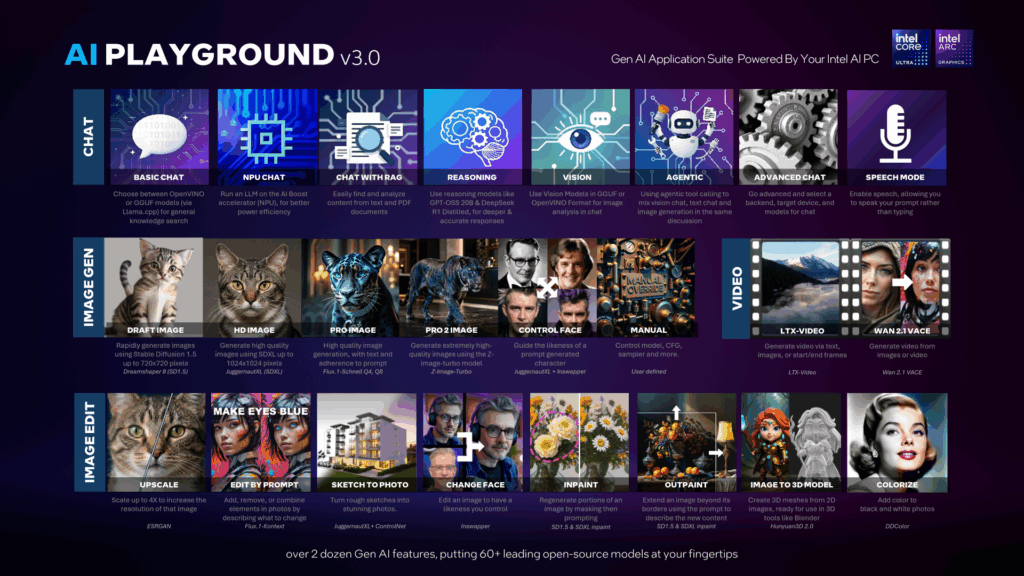
AI Playground beta is a free to download and app for doing Gen AI inferencing on your Intel Core Ultra or Intel Arc GPU based systems. AI Playground curates over 60 top open-source models and ties them to a variety of point and click features for chat, image generation, image generation and video.
Easy To Use: AI Playground is designed to be easy to use, allowing you to get working with AI quickly. AI Playground will prompt you if and when a model is needed for a task, allowing you to download one, or provide your own. And our settings are written and designed using terms that make sense for the task without you having to be educated on AI just to use AI.
All-In-One AI Hub: Switch seamlessly between usages of image creation, image editing, and a chat LLM . AI Playground keeps it all together in one easy-to-use experience. Currently AI Playground supports Stable Diffusion 1.5, Stable Diffusion XL, Flux.1-Schnell, LCM Fast LoRAs, Image Upscale, Image to Image Stylization, Inpainting, Outpainting, ChatBot with session history context and LLM RAG features allowing you to get summaries, and search content from your local computer.
Flexible: AI Playground will provide access to models for all features, and more advanced users can install their favorite models and tweak manual settings, to configure AI Playground to work the way they want it to work.
Local: AI Playground is locally run, therefore your prompts, and the output never leave your computer. This provides you privacy and control of your content and input for working with AI, and puts you in control without an upstream entity over your shoulder censoring your prompts or capturing your data and content.
Hardware Optimized: AI Playground takes advantage of Intel Arc GPU architecture leveraging our powerful Intel Xe Cores and XMX engine.
Open: AI Playground is also an open-source project where our community can clone, fork or help us address features and capabilities of the main repo.
Core Features
AI Playground is a locally run Generative AI application suite that acts as an offline alternative to cloud tools such Gemini ChatGPT and Grok. AI Playground is intended to give consumers and AI curious prosumer easy and intuitive access to a wide variety of generative AI features using their Intel powered AI PC. This means you can be offline, without loading sensitive or personal data to 3rd party sites, for free, in a single app without having to know how to install and manage multiple AI backend frameworks. Key features:
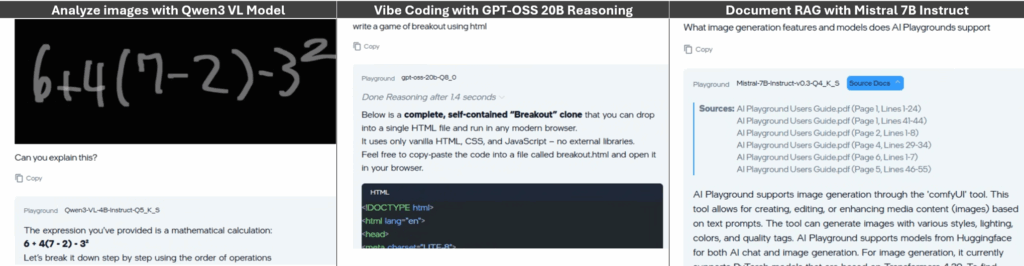
- Latest and greatest chat models: Support for Qwen 3 VL, Mistral 7B, DeepSeek R1 or GPT-OSS, AI playground makes a variety of chat models available to users
- Vision, Reasoning and RAG: Chat features support Vision, Reasoning and RAG to analyze and get deep answers on both visual and text content.
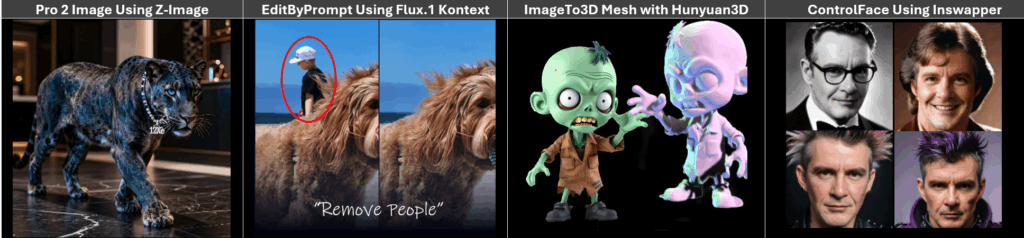
- Image Generation: From Stable Diffusion 1.5, SDXL, Flux.1 and Z-image models AI Playground is making a breadth of image generation from quick easy low-res draft generation to high quality image generation
- Image Editing: Subscription free and private control for upscaling, inpainting, outpainting, 2D to 3D mesh or editing images in a variety of ways. Good for editing personal photos to taking sketches and generated images to the next level with greater control.
New To AI Playground
AI Playground delivers an array of new solutions, each expanding what AI Playground can do, building on its modular architecture to deliver value and capabilities even between releases.
New Modalities
- Voice mode: AI Playground now supports a voice mode. From the app settings you can turn on Voice mode. This will load an AI voice model to the NPU of your Intel Core Ultra PC. When enabled a microphone icon will be available in the prompt. Simple click the icon and voice your prompt. Voice mode will convert your voice to text prompt
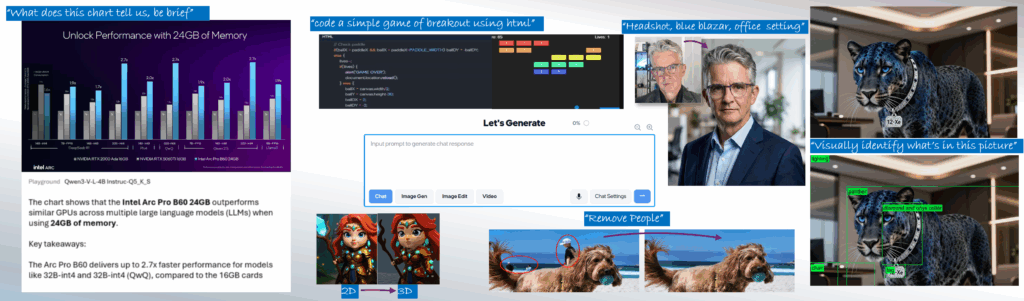
- Vision Model Support: New to AI Playground is Vision Model support. With Vision support you can paste or load an image to Chat mode and have AI Playground analyze the image, giving you insight, answers and information about the image
- Agentic Multi-Modal Tools. AI Playground exposes MCP tooling to our chat mode allowing you to use a core model to do agentic tasks across AI Playground features within a single chat discussion. This feature will allow you to use text chat, vision chat, and image generation withing a single discussion window. See Agentic Preset for more information
Unified Prompt:
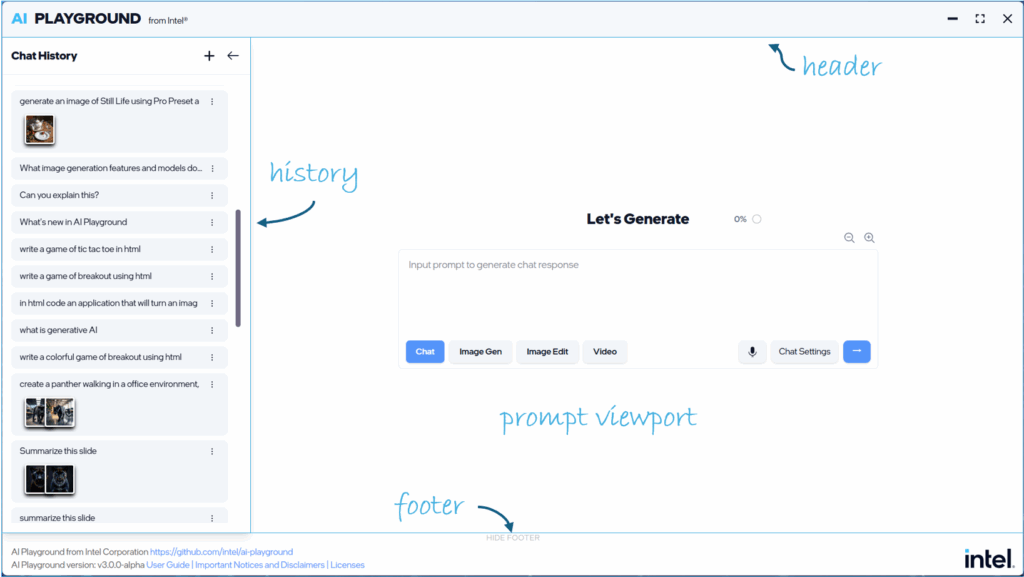
AI Playground now deploys a single unified prompt window for all AI Playground features. This design aligns AI Playground to familiar AI tools like Gemini, Chat GPT and Grok
Light Theme:
You can now choose to experience AI Playground in a light-colored theme
Prompt Modes, Settings and Presets:
The main prompt can now be directed to specific models and tasks through the Prompt Mode, Prompt Settings and Prompt Presets.
- Prompt Modes allow you to quickly and easily change between modalities from the main prompt: Select chat for vision and text based chat responses, Image Gen for image generation from text. Image Edit for altering or enhancing images. Video Gen: For creating video content from text or image input
- Prompt Mode Presets: From the Prompt Settings button you have access to dozens of Presets. Presets are similar to the previous AI Playground “Workflows” Settings, configured for specific tasks and usages but are now expanded to all Prompt modes. With Presets you can quickly access a define usage for Chat, Image Gen, Image Edit or Video where the model selections and settings are preset for that task. See the Preset Section for more information
Backends:
- OpenVINO: OpenVINO provides the best performance when using OpenVINO IR Models with the ability to target CPU, NPU or GPU. AI Playground provides access to a variety of chat, reasoning, vision and tool calling models in OpenVINO format in Chat mode:
- Llama.CPP: For access to latest models in GGUF format, AI Playground provides models such as Qwen 3VL, DeepSeek R1 Distilled, and GPT-OSS 20B in GGUF format, for use in the chat mode
- PyTorch: PyTorch is primarily used to support image diffusion based models for image generation, image editing and video generation. We provide access to models such as SDXL, Flux.1 Schnell, Z-Image-Turbo and more
- ComfyUI: is a backend solution allowing us to easily create and deploy custom workflows for specific image and video Preset
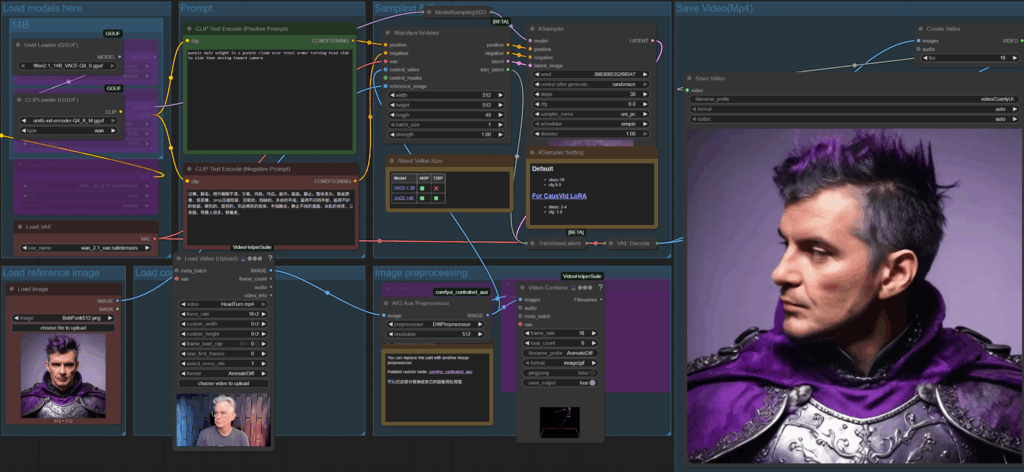
ComfyUI Editor
For users interested in diving into ComfyUI workflows, or those already familiar with ComfyUI, we’ve provided direct access to its workflow editor, allowing users to edit or create workflows for use either directly from ComfyUI or in AI Playground. We encourage and welcome the community created workflows submitted and shared to AI Playground via Pull Requests to our project
See AI Playground In Action
AI Playground 3.0 at CES 2026
Demo Reel
Introduction Video of Core Features
Install Image Checkpoints
For more information, visit the AI Playground project on GitHub, or join our Intel Insiders Discord to engage directly with Intel and our Community on AI Playground
Notices and Disclaimers: For information on AI Playground terms, license and disclaimers, visit the project and files on GitHub repo: