Say goodbye to shader compilation stutters and lengthy loading screens 
What It Is
Intel Precompiled Shaders is a game-changing technology that automatically downloads pre-optimized shader files from Intel’s cloud storage directly to your PC. Instead of forcing your system to compile shaders, this innovative feature delivers ready-to-use shader files that dramatically reduce loading times and eliminate those frustrating stutters that occur when shaders compile on-the-fly.
Think of it as having a head start on the first game launch – we compile the shaders and deliver them to you, so your gaming experience starts off faster and is smooth from the moment you hit play.
While Intel Precompiled Shaders Distribution Service is available today on a select list of Steam titles, we’ve also recently announced working closely with Microsoft on launching Advanced Shader Delivery for Windows later this year. With this added support, users of Intel® Arc™ GPUs will reap the benefits of precompiled shaders across more games and game stores.
How It Works
Traditional gaming requires your PC to compile shaders locally the first time you launch a game, encounter new visual elements, or install a new GPU driver. This process extends loading times – sometimes well over a few minutes – and can cause noticeable stutters when there’s a backlog in the shader compilation queue, interrupting your gameplay flow.
Intel Precompiled Shaders solves both problems with a simple, innovative approach:
- Pre-Compilation: Shader files are compiled and pre-loaded in Intel’s cloud infrastructure
- Automatic Detection: When you install a supported game, the Intel Graphics Software automatically checks for matching pre-compiled shader files
- Cloud Delivery: Optimized files for your specific hardware and driver configuration are downloaded from Intel’s servers and cached locally on your system
- Seamless Integration: Supported games will automatically use the shaders cached locally when launched from a supported platform
Benefits You Can Expect
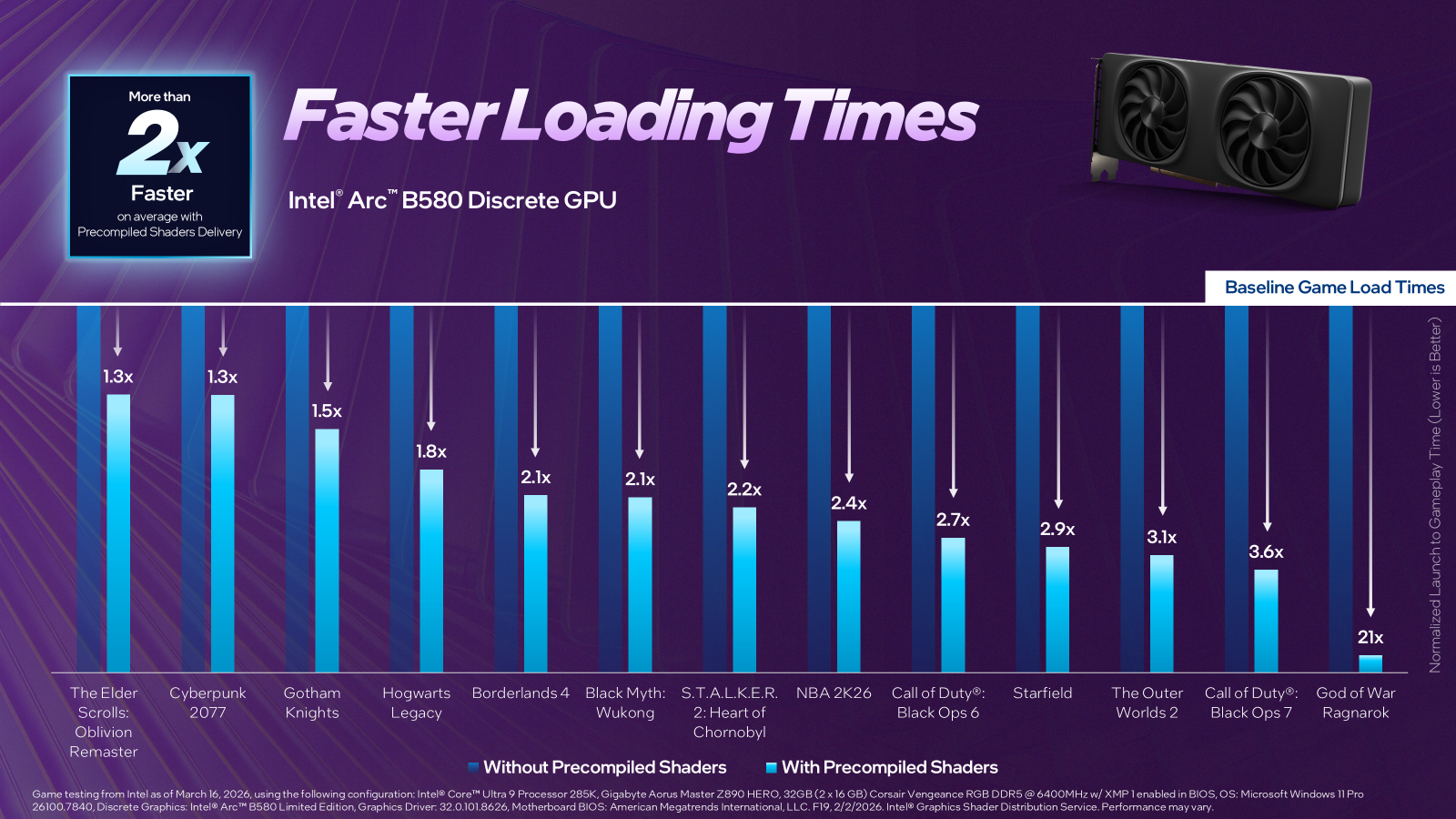
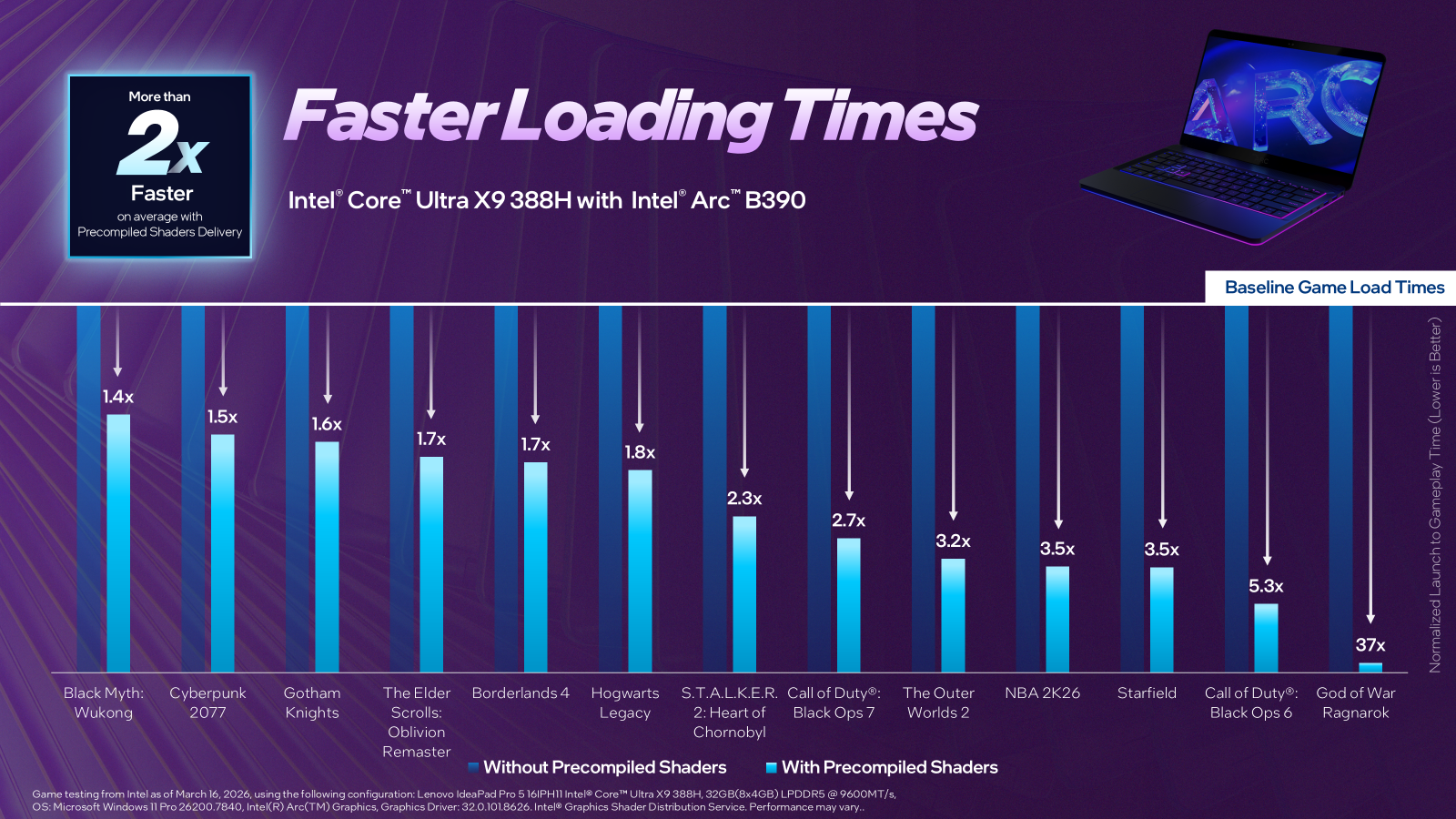
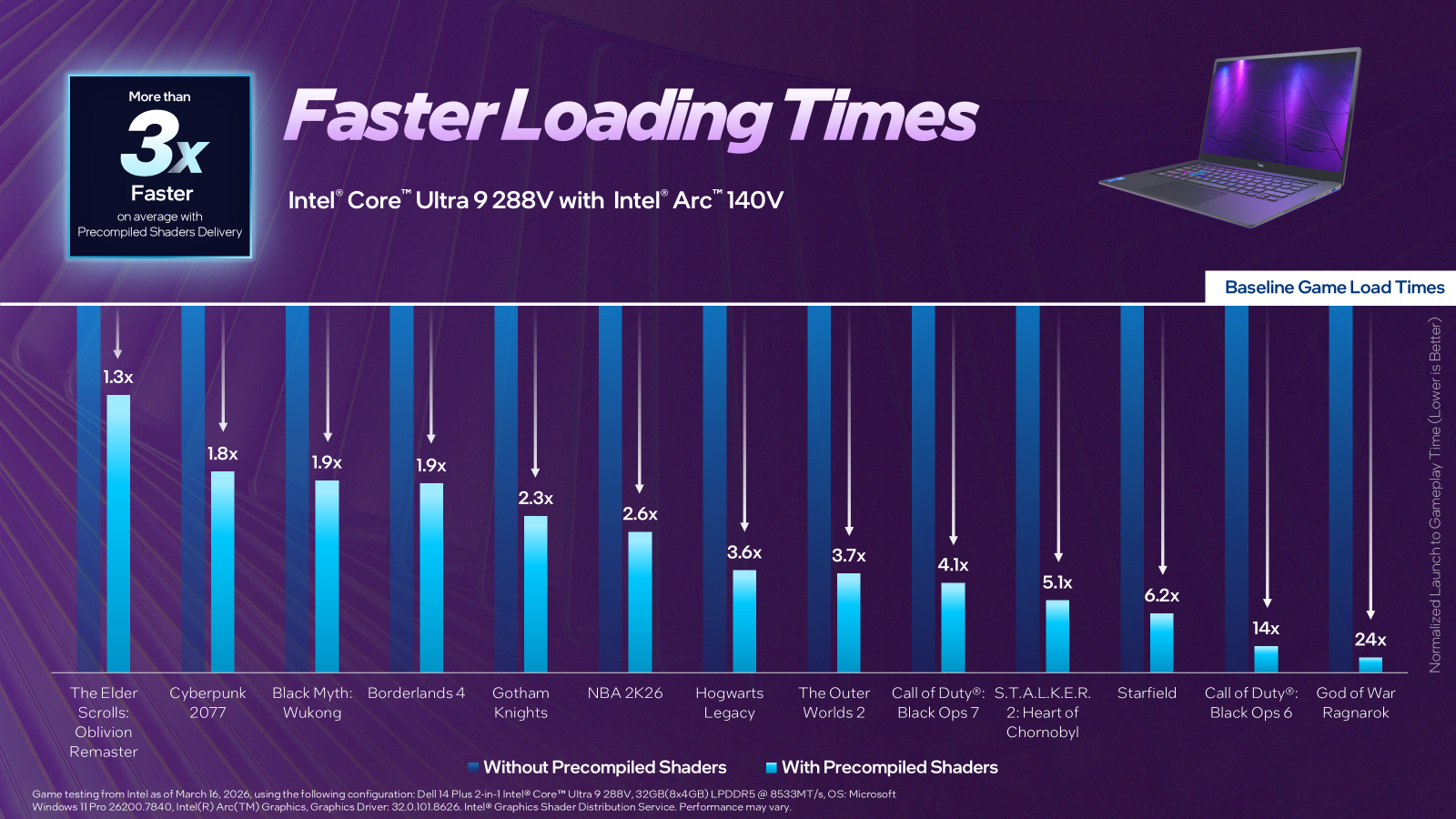
Faster Loading Time – Users typically experience significant improvements in initial game loading, with reductions ranging from 1.3x to over 5x depending on the game and system configuration.
Elimination of Shader Compilation Stutter – No more jarring interruptions during gameplay caused by real-time shader compilation. Your gaming experience remains fluid and immersive.
Immediate Performance Gain – Unlike traditional shader caching that builds up over time, precompiled shaders deliver benefits from your very first game launch.
How to Enable
Intel Precompiled Shaders is disabled by default on supported systems, giving you full control over the feature.
To Enable Precompiled Shaders:
- Open Intel Graphics Software
- Navigate to Graphics → 3D Rendering → Precompiled Shaders
- Toggle “Precompiled Shaders” to ON

Once enabled, the system will automatically download shader cache files for all supported Steam games currently installed on your system. Future installations of supported games will also trigger automatic shader cache downloads.
System Requirements:
- Hardware: Intel® Arc™ GPUs built into Intel® Core™ Ultra 3/200V series, Intel® Arc™ B-Series discrete GPUs
- Driver: Version 32.0.101.8626 or newer
- OS: Windows 10/11
- Storage: 1GB+ available space (more for larger game libraries)
- Internet: Active connection required for downloads
Supported Games
- Black Myth: Wukong
- Borderlands 4
- Call of Duty®: Black Ops 6
- Call of Duty®: Black Ops 7
- Cyberpunk 2077
- God of War Ragnarök
- Gotham Knights
- Hogwarts Legacy
- NBA 2K26
- Starfield
- S.T.A.L.K.E.R. 2: Heart of Chornobyl
- The Elder Scrolls IV: Oblivion Remastered
- The Outer Worlds 2
Note: Game support continues to expand with driver updates. The feature currently works exclusively with games installed through Steam Games Store.
Notices and Disclaimers
Performance varies by use, configuration and other factors. Learn more at www.intel.com/performanceindex.
Performance results are based on testing as of the dates shown in configurations and may not reflect all publicly available updates.
No product or component can be absolutely secure. Your costs and results may vary. Intel technologies may require enabled hardware, software or service activation. [game.intel.com]
© Intel Corporation. Intel, the Intel logo, and other Intel marks are trademarks of Intel Corporation or its subsidiaries. Other names and brands may be claimed as the property of others.